Configure public contest voting and verification
Set gallery vote limits, dates, email verification, public counts, and voter consent.
Enable voting on your gallery
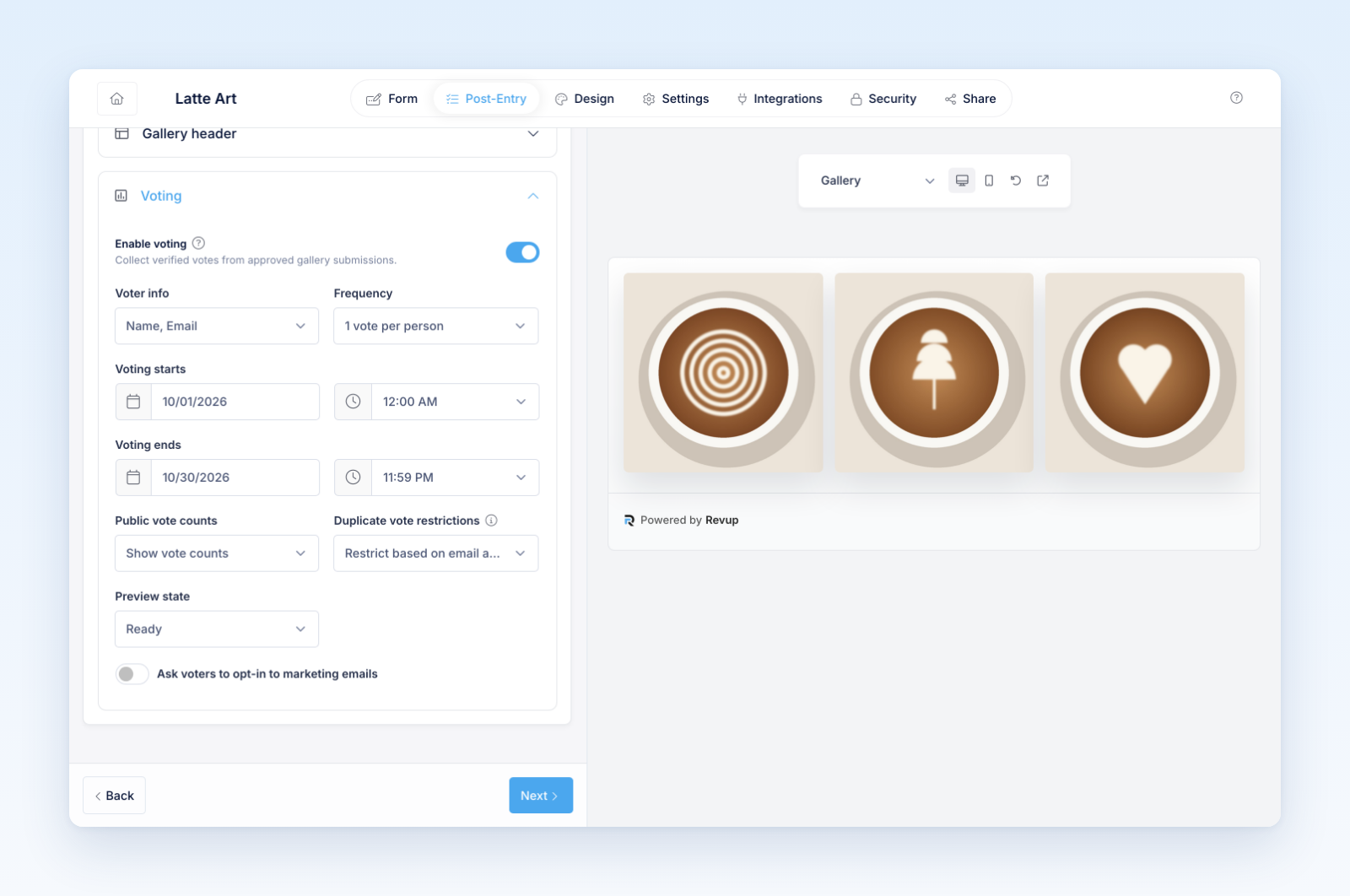
Open Post-Entry → Gallery → Voting in a Contest and turn on Enable voting. Public voting applies to approved, visible submissions. It does not automatically choose a contest winner.
- Choose Voter info: Name, Email or Name, Email, Phone.
- Choose Frequency from the four options below.
- Set Voting starts and Voting ends. When separate voting dates are absent, the promotion dates provide the voting window. Times use the promotion's time zone.
- Choose Public vote counts: Show vote counts or Hide vote counts.
- Choose Duplicate vote restrictions.
- Review the public experience using Preview state, then test on the public gallery.
Set the vote limit
Restrict based on email address only is suitable for shared networks. Restrict based on email and IP address also applies the chosen limit to the internet connection. Different people at a school, office, household, or event can share an IP address.
Email verification and marketing consent
Voting uses email verification automatically; there is no switch here to make an unverified email count as a verified voter. New verification codes expire after 15 minutes. Revup can remember successful verification for the same voter and browser context, so an eligible returning voter may not need another code.
Ask voters to opt-in to marketing emails adds a separate marketing choice and editable consent wording. Verification proves access to the mailbox for voting; it is not marketing permission. Adding Phone to Voter info does not make email verification an SMS verification process.
Test and review votes
Test Ready, Voted, Disabled, Not started, Ended, Pending verification, and Verification failed preview states. Then test real email delivery, the selected limit, and the daily boundary with dedicated test identities. Hiding public counts does not delete recorded votes.
Monitor unexpected patterns in the contest's Votes area. State in your rules whether votes select finalists, inform judging, or determine the result. Select winners through the separate winner workflow after the required review.
Was this helpful?
Still need help? Ask the team